
|
| Catch Zero-Day Malware with Cloudmersive Multi-Threat Detection |
| 5/7/2026 - Brian O'Neill |
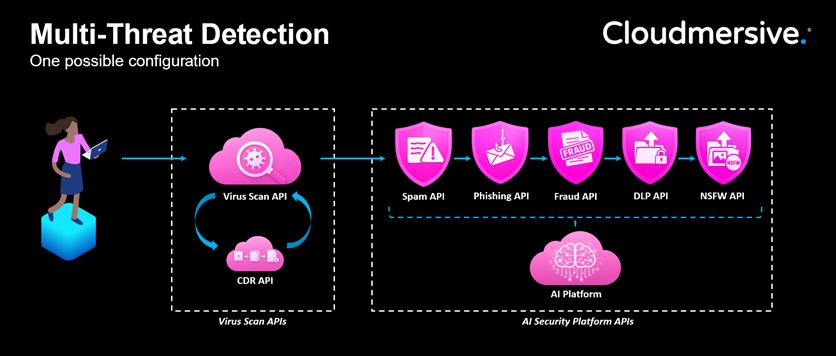
Every file upload is a riskEvery enterprise application that accepts file uploads also accepts a degree of risk. It doesn’t matter if it’s a vendor submitting an invoice, or a candidate uploading a resume, or a customer sharing a support document: each action is routine, and each is a potential entry point for malware that your existing security tools might never have encountered before. The most dangerous malware circulating today hasn’t been studied and catalogued yet. Zero-day threats don’t have a signature you can match against, and that means they pass straight through basic signature-based scanning tools without any flags or warnings. By the time new threat variants make it to a signature database, there’s a good chance they’ve already damaged hundreds of enterprise networks on the way there. Without real-time zero-day threat detection at the upload layer, a compromised file moves freely through your pipeline before anyone knows what it contains: into storage, into processing workflows, or straight into the hands of employees. Why traditional antivirus isn’t enoughMany organizations still have an instinct to rely on endpoint antivirus software to catch zero-day threats. The problem is that Endpoint AV tends to catch threats after they’ve already landed on someone’s machine. By then, the damage window is wide open. Signature-based detection compounds the problem. Legacy AV tools with signature-only policies compare files against a database of known threats when that database is, by definition, lagging behind the current threat landscape. The modern threat landscape demands more. Attackers are deploying polymorphic code that mutates to avoid detection, and they’re embedding threats inside legitimate file formats. They’re packaging payloads inside nested archives specifically designed to exhaust or confuse naïve scanning tools. A signature database updated once a day (or even once an hour) just isn’t keeping pace with that. The world traditional AV was designed for doesn’t exist anymore. How the Cloudmersive Virus Scan API addresses thisThe Cloudmersive Virus Scan API scans every file in-memory at sub-second speed. It handles the known threat landscape with signature-based detection, but it separates from legacy tools by acing the edge cases. The Virus Scan API maintains a Zero Day Detection Rate (ZDDR) of 98% against threat samples not yet listed in any antivirus signature database. That means it consistently identifies threats at scale that have never been catalogued or studied. Given a contemporary threat environment where novel malware variants are released faster than any database can track them, ZDDR is the figure that matters. The API’s advanced scan endpoint returns a granular breakdown of file contents beyond simple virus detection. It deterministically identifies embedded executables, scripts, macros, unsafe archives, OLE embedded objects, insecure deserialization patterns, and more. File type enforcement adds a layer of customization: enterprises can restrict inputs to exactly the formats their application should be accepting, and anything outside those parameters instantly comes back with a threat designation. For files which contain threats but still need to reach their destination, the Virus Scan API works in conjunction with the Cloudmersive Content Disarm and Reconstruction (CDR) API under the hood. Instead of blocking a threat, the CDR API tears the file down and rebuilds a safe version of it. If, for example, a Word document upload contained an embedded macro, the CDR API would simply rebuild the document without the macro present. The end user gets their file; the threat never makes it through. Together, these capabilities mean the Virus Scan API is closing the structural gaps that let unknown threats pass through legacy AV. Where the Virus Scan API fits in your pipelineVirus scanning belongs at every point where external content enters your infrastructure. The most critical chokepoint is the file upload endpoint: any form, portal, API surface, etc. accepting files from outside your organization. Document processing pipelines are another natural fit, particularly where files move from intake to storage to employee access without a scanning step in between. For organizations running Cloudmersive Multi-Threat Detection, virus scanning is typically the first step in the scanning sequence. It casts the broadest net, and it makes sense to look for file-borne threats before passing content downstream to fraud detection, spam detection, data loss prevention, or content moderation. Deployment optionsLike all Cloudmersive APIs, the Virus Scan API is available across the full range of deployment options described below. Enterprises can integrate wherever fits best in their existing architecture, and under whatever regulatory or data governance constraints apply to their environment. Managed InstanceThese deployments leverage dedicated, managed infrastructure with SLAs, customizable deployment, and security. Private CloudThese deployments can take place on the customer’s premises or in a cloud platform of their choice. Public CloudThese deployments leverage Cloudmersive’s multi-tenant public cloud offering. PaaSThese deployments take advantage of Azure App Service or Azure Kubernetes Service offerings. Government CloudThese deployments take place in a specified government cloud region, suiting the data governance requirements of government entities. Get startedVirus scanning is the first pillar of Cloudmersive Multi-Threat Detection: the component that catches what every other pillar assumes has already been handled. Every other pillar in the stack assumes the files it’s analyzing are at least structurally safe, and the Virus Scan API makes that assumption valid. To learn more about the Virus Scan API, visit our documentation or API console for technical details and code examples. For expert advice and/or to book a Multi-Threat Detection demo with your data, reach out to a member of our team. |
Sign Up Now or 

 Blog
Blog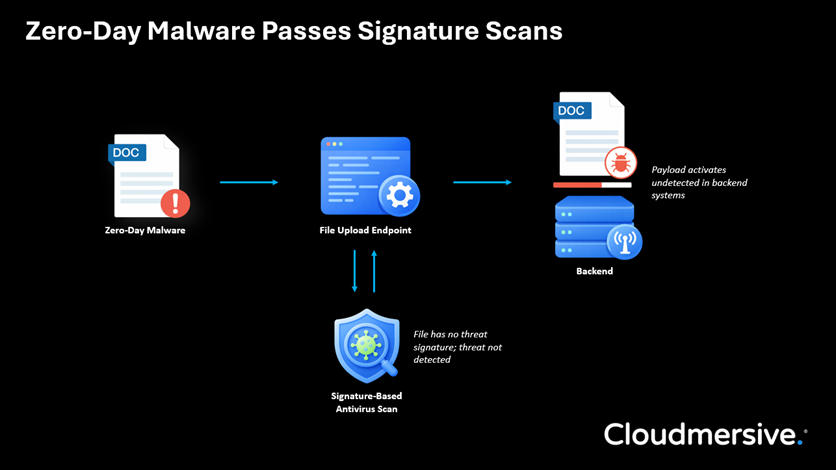
 Virus Scan APIs
 Content Disarm and Reconstruction APIs
 Spam Detection APIs
 Document Conversion & Processing APIs
 Document AI APIs
 Natural Language Processing (NLP) APIs
 Optical Character Recognition (OCR) APIs
 Image and Face Recognition and Processing APIs