
|
| How Long Does a Virus Scan Take Based on File Size | ||||||||||||||||||||||||||||||||||||||||||||||||||||||||||||||||||||||||
| 8/19/2026 - Brian O'Neill | ||||||||||||||||||||||||||||||||||||||||||||||||||||||||||||||||||||||||
File size affects a virus scanning workflow in two related but distinct ways. It influences how long the scan is likely to take, and at sufficiently large sizes, it can influence how the file should be transferred to the scanning service. We previously explored the transfer side of this problem in our article on How to Scan Large Files for Viruses and Malware. That article focuses on maintaining complete malware inspection as files move beyond conventional upload limits, including the role of standard and chunked HTTP transfer. Here, we’re interested in a different question: how should developers think about scan time as file size increases? 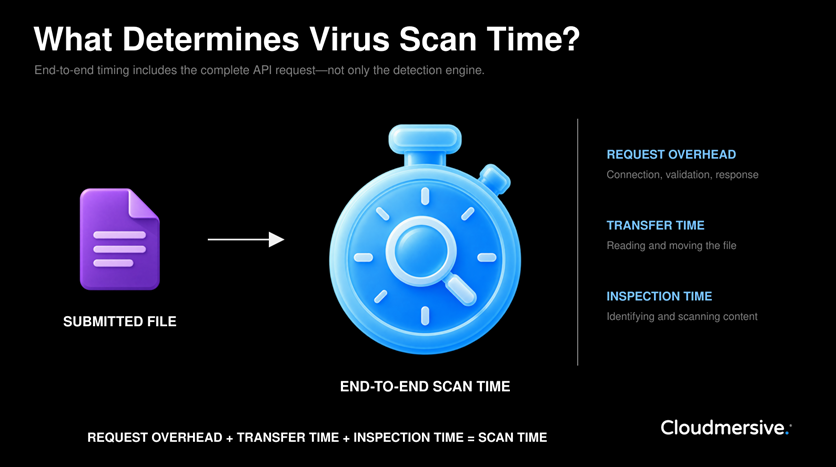
The answer isn’t a single seconds-per-megabyte figure. Scan time includes a fixed amount of work that occurs for every request, a variable amount of work related to file size, and additional variation caused by file format, internal complexity, network conditions, and scan configuration. A Practical Framework for Estimating Scan TimeWhen we discuss scan time in an application workflow, we're generally talking about the complete interval between sending the API request and receiving the result. This is end-to-end response time, not simply the time spent inside the malware detection engine. We can model this as a fairly simple relationship:
Scan Time Model
End-to-end scan time
≈
request overhead
+
transfer time
+
inspection time
Think of "request overhead" as you would the electricity bill you pay to keep your office lights on—it’s consistent work that occurs for every scan. The client must establish or reuse a connection, prepare the request, and wait for the service to validate the input and construct a response. These steps still occur when the file itself is very small. For a small file, that baseline work often represents most of the total response time. As files become larger, however, transferring and inspecting the file data accounts for a progressively greater share of the total. This means a 25 KB file won’t necessarily complete its scan in a tiny fraction of the time required for a 5 MB file. Both requests incur the same general setup and response costs. The larger file then adds more transfer and inspection work on top of that baseline. When file type, scan configuration, content complexity, and network conditions remain broadly comparable, scan time should increase approximately in proportion to file size. That doesn’t mean doubling the file size will always double the total response time; it means the variable portion of the work generally grows with the amount of data being processed. How File Size Changes Direct Scan TimeMost ordinary files can be scanned through a single synchronous HTTP request. That typically looks like this: the application submits the file, waits for the scan to finish, and receives the completed result in the response.
Input
Application receives file
Upload
File is sent for scanning
Validate
File format is verified
Inspect
File content is scanned
Result
Security result is returned
A standard upload normally declares the total request-body size in advance through the For direct scans, increasing file size can add time in several places:
The relative importance of each stage depends first on the environment. A client with high available bandwidth and low network latency may spend a greater percentage of the total time on the inspection portion of the scan, while a geographically distant client with a slower connection may spend more time uploading the same file. This is why scan-time benchmarks for any organization should be treated as complete application measurements. They describe what a particular client experienced under particular conditions, not the isolated speed of the malware engine itself. For planning purposes, developers need to test representative files from the intended workflow and record multiple results per file. An average scan time per file type and file size provides a useful baseline, while minimum, maximum, and percentile measurements reveal how much variation the application may need to accommodate. How Chunked Transfer Changes the Timing ModelStandard and chunked transfer address different ways of delivering a scan request body. They do not (and should not) represent different levels of malware inspection. In this context, "chunked transfer" refers to HTTP/1.1 chunked transfer encoding. Under this protocol, the client sends one request body as a sequence of length-delimited chunks instead of declaring the total content length before transmission. Note that this isn’t the same as a multipart or resumable upload made up of several independent requests; those concepts sound similar but have completely different meanings. Chunked transfer changes the timing model. That's because compatible scanning services can begin receiving and processing initial portions of the stream before the final portion arrives. Transfer and inspection can therefore overlap to some extent instead of occurring as two completely separate phases of the process. That overlap typically reduces the delay before scanning begins and improves memory management for very large requests. It doesn’t eliminate the cost associated with file size, however. Every byte must still cross the network, and the service must still receive enough context to evaluate the complete file before returning a final evaluation of the file's security status. The important thing is not to view chunked transfer as a method for making multi-gigabyte files scan like small documents. Its primary benefit is making very large transfers practical and allowing processing to begin earlier. If you're interested, the earlier large-file scanning article we mentioned explores this transfer method in greater detail, including why large files must not be skipped or only partially scanned. For scan-time planning, the key point is that crossing the chunked-transfer threshold changes how transfer and inspection can overlap, but it doesn’t remove the underlying relationship between data volume and processing time. Why File Size Alone Cannot Predict Scan TimeFile size tells us how much data a file holds, and consequently how much data must be transferred. It doesn’t reveal how much work will be required to interpret that data. Two files of the same size can have very different internal structures. For example, a raster image may consist primarily of image data and metadata, while a similarly sized PDF may contain compressed streams, fonts, forms, JavaScript, attachments, and embedded documents. Modern Microsoft Office files (i.e., Word, Excel, PowerPoint, etc.) are packages containing multiple Extensible Markup Language (XML) files, images, relationships, formulas, macros, and other resources. Though we view such documents as singular self-contained files, a virus scanner needs to inspect these components individually while also verifying that the overall document package is structurally valid. Compressed archives like ZIP, RAR, TAR, etc. introduce the greatest amount of variation. The compressed size of a ZIP file doesn’t reveal its uncompressed size, internal file count, compression ratio, or nesting depth. A 100 MB archive could contain one large file, thousands of small files, or several additional archives nested inside it, each one packed with its own mystery contents. Scan configuration also matters. A basic malware scan (e.g., matching malware signatures from a database) and an advanced scan (e.g., one that checks for invalid formats, scripts, macros, password protection, unsafe archives, and embedded objects) aren’t necessarily performing the same amount of work. File size defines the scale of the transfer. File format, internal structure, and enabled security checks determine the complexity of the inspection. What Our Cloudmersive Benchmarks ShowTo establish practical reference points, we tested Microsoft Office documents, PDFs, image formats, ZIP archives, and MP4 videos across a wide range of file sizes with the Cloudmersive Advanced Virus Scan API. Each file was scanned five times, and the values presented below represent average end-to-end response times from that test environment.
Across the complete dataset, larger files generally produced higher average response times as expected. The relationship wasn’t perfectly proportional or consistently upward at every tested size, but the broader size-related trend remained clear. The Cloudmersive Virus Scan API supports standard HTTP file transfer for files up to 2 GB and chunked transfer for files beyond 2 GB. That threshold changes the delivery method, but the same general planning principles still apply: measure the complete request, keep file families separate, repeat each test, and account for variation around the average. ConclusionFile size provides a useful foundation for estimating virus scan time, but it shouldn’t be converted into one universal seconds-per-megabyte rule. For comparable files scanned under comparable conditions, end-to-end response time generally consists of a baseline request cost plus a variable cost that grows with file size. File format, internal complexity, enabled security checks, and network conditions determine how far an individual result may deviate from that estimate. Standard and chunked HTTP transfer affect how the file reaches the scanning service, but they don’t change the fundamental need to inspect the complete file. Chunked transfer can allow transfer and processing to overlap for very large files, while the overall completion time still reflects the amount and complexity of the submitted data. The most reliable approach is to benchmark representative files, separate the results by file family, and build a simple planning model from repeated measurements. To discuss expected performance for a specific workload, contact a Cloudmersive representative for guidance on testing, transfer strategy, and scanning architecture. |
Sign Up Now or 

 Technical Articles
 Virus Scan APIs
 Content Disarm and Reconstruction APIs
 Spam Detection APIs
 Document Conversion & Processing APIs
 Document AI APIs
 Natural Language Processing (NLP) APIs
 Optical Character Recognition (OCR) APIs
 Image and Face Recognition and Processing APIs