
|
| How to Scan Large Files for Viruses and Malware |
| 5/18/2026 - Brian O'Neill |
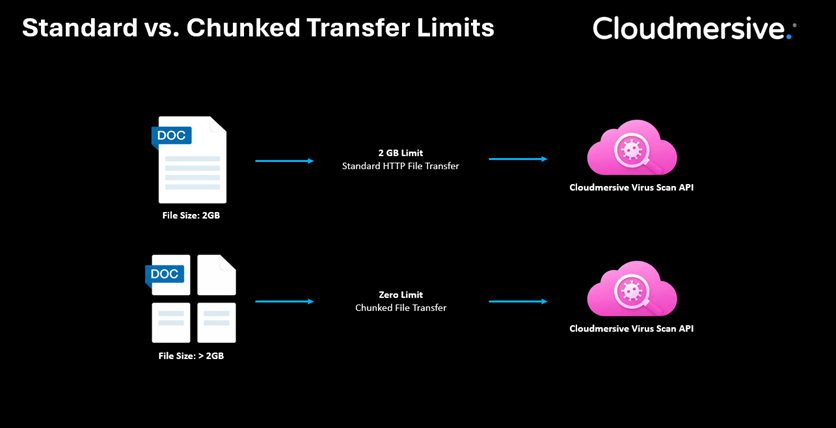
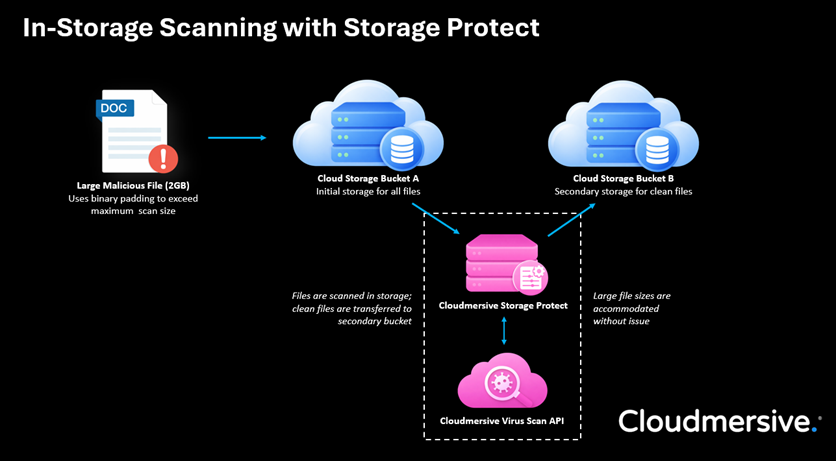
In file upload security, it’s tempting to focus entirely on what’s inside a file. What kind of malware does a file carry, and what format did it arrive in? Will the file pass a virus scan check at the point of ingestion, and if so, should there be a secondary check later in the pipeline? What gets far less attention is file size. Scanning large files presents virus scanning challenges that scanning smaller files doesn't, and those challenges are actively documented and exploited by threat actors. In this article, we’ll look at what makes large file scanning difficult, and we’ll explore how that relates to HTTP transfer methods used to accommodate large file uploads. At the end, we’ll walk through how the Cloudmersive Virus Scan API addresses large file sizes without hard limits, whether they originate from file upload endpoints or already reside in cloud storage buckets. Why Large Files Are a Security ProblemThere’s a really simple performance tradeoff at the heart of large file scanning: scanning a large file takes more time and consumes more memory than scanning a small one. In response to this constraint, it’s common for antivirus solutions to enforce file-size limits, above which files are often either partially scanned or skipped over in the scanning process entirely. That might seem like a reasonable engineering decision in theory, but it introduces a severe and well-documented security consequence. Threat actors can actively exploit file-size limitations with a well-established evasion technique called binary padding. This approach involves adding junk data to a file to increase its size beyond a scanner’s limits without affecting the embedded malware’s functionality or behavior. This padding also benefits threat actors by changing the file’s checksum, which helps the embedded payload evade hash-based blocklists and static antivirus signatures too. Unlike many other exploitation techniques, binary padding doesn’t require sophisticated execution. For example, a tiny zip file can conceal a payload that expands to 100+ MB on extraction during the scanning process, which pushes it far past the file-size limits many scanning configurations use. In those cases, the scanner will simply stop looking for threats, allowing malware to pass through the file intake pipeline. Enterprises with this kind of detection policy should expect threat actors to exploit it, and the only reliable fix is to implement a scanning solution that doesn't sacrifice thoroughness for performance. Why the Upload Transfer Method Should MatterThe file-size problem doesn’t live at the scanner alone. The transfer method used to deliver large files introduces its own set of constraints that interact directly with how scanning solutions should behave. Most enterprise teams rely on one of two HTTP file upload transfer methods for file intake: Standard HTTP for small to mid-sized files, and chunked transfer for large files (e.g., > 2GB). In the midst of this selection, what tends to get less scrutiny is whether the antivirus solution downstream in that pipeline actually cares about the difference between those two transfer methods. In theory, if transfer method is a consideration for the security team, it should be a consideration for the security tool as well. In fact, many antivirus solutions don’t change behavior based on transfer method at all. They apply the same file-size limits regardless of how the file arrived, treating chunked uploads no differently than standard ones. That means files too large to scan via standard transfer are equally likely to be partially scanned or skipped when they arrive via chunked transfer, even though chunked was specifically chosen to avoid problems related to large files in the first place. For enterprises running file intake workflows that accept large uploads from external sources, it’s worth addressing whether the antivirus solution in that pipeline accommodates file size differences in a dynamic, meaningful way. Chunked transfer solves the transport problem for large files, but if the antivirus solution doesn’t respect that difference, it leaves a major security gap. Blindly applying the same file-size limits to both transfer methods is one reason why binary padding remains an effective, widespread evasion technique in the first place. How the Cloudmersive Virus Scan API Handles Large FilesThe Cloudmersive Virus Scan API addresses both problems outlined above directly: it supports large file sizes without ever reducing detection capabilities, and it does this by treating standard and chunked transfer methods with the unique consideration they deserve rather than applying a one-size-fits-all file-size limit to both. The API’s thresholds are simple. Files up to 2GB in size are supported for standard HTTP file transfer, and files beyond 2GB in size are supported for chunked transfer. The elected transfer method dictates the file size limitation rather than an arbitrary file-size rule. About the Cloudmersive Virus Scan APIThe Cloudmersive Virus Scan API is an advanced virus and malware scanning solution which combines two critical layers of threat detection. The first layer is signature-based scanning against a continuously updated database of 17 million+ virus and malware signatures, which covers the broad known threat landscape (i.e., viruses, trojans, ransomware, spyware, and more). The second layer is advanced zero-day threat detection for threats which haven’t yet been catalogued in a signature database. The second layer is measured by Zero-Day Detection Rate (ZDDR): the percentage of zero-day threat samples (meaning those not yet present in any antivirus signature database) that scanner successfully identifies. The Cloudmersive Virus Scan API maintains a ZDDR of 98%, meaning it catches the vast majority of novel threats before they’ve been documented anywhere. For large file workflows specifically, where binary padding is explicitly designed to exploit the blind spots of signature-based scanning, that zero-day detection can be the difference between detection and a successful attack. Beyond malware detection, the API exposes a set of configurable threat rules designed to give security teams precise control over what content is permitted through a given endpoint. Specific content types like executables, invalid files, scripts, macros, password-protected files, unsafe archives, OLE embedded objects, and other content categories can each be blocked or permitted independently to match the risk profile of a specific workflow. For large file workflows specifically, it’s worth paying close attention “invalid files” flag. If a file fails the API’s content verification check against its declared format, that’s a meaningful signal: format mismatches are a common characteristic of binary padding (or any form of file manipulation where the goal is to exceed size-based scanning limits undetected). Direct Scanning for Large Files in Cloud StorageUpload endpoints aren’t the only surface that matters for large-file workflows. Files that land in cloud storage buckets present a problem quite different from upload-time scanning, and it’s an easy one to underestimate. In large cloud provider environments, the absence of active malware scanning allows infected files to sit in storage and eventually propagate downstream to systems that pull from those buckets. Those systems don’t have any awareness of what they’re receiving; a file that arrived through this path having bypassed an upload endpoint entirely (or possibly predating any scanning policy) carries whatever risk it arrived with indefinitely. Cloudmersive addresses this issue with Storage Protect, a no-code Virus Scan API deployment which connects directly to cloud storage environments. Storage Protect calls the Virus Scan API under the hood without requiring any changes to existing application code or upload pipelines. The same file-size considerations that apply to upload-time scanning apply here as well: Storage Protect doesn’t enforce arbitrary size limits against stored objects. Files of all sizes are evaluated with the same thoroughness as files scanned at the point of upload. Key TakeawaysIn this article, we learned the following:
For expert advice on deploying the Cloudmersive Virus Scan API to support large file scanning in your enterprise environment, please do not hesitate to contact the Cloudmersive team directly. |
Sign Up Now or 

 Technical Articles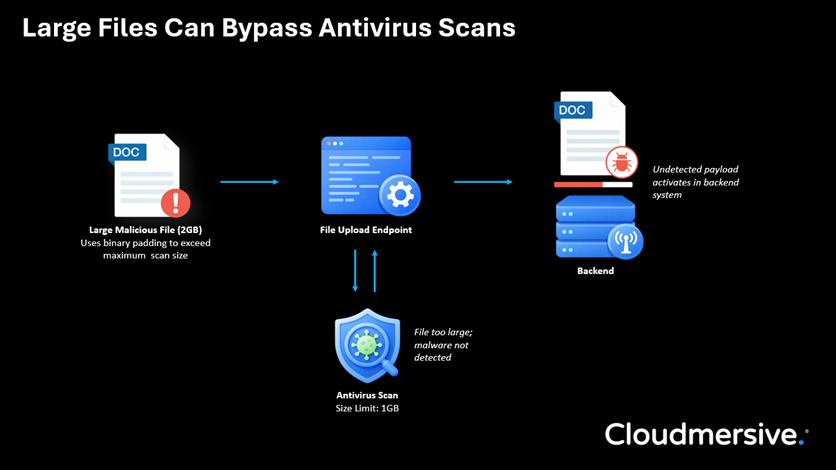
 Virus Scan APIs
 Content Disarm and Reconstruction APIs
 Spam Detection APIs
 Document Conversion & Processing APIs
 Document AI APIs
 Natural Language Processing (NLP) APIs
 Optical Character Recognition (OCR) APIs
 Image and Face Recognition and Processing APIs