
|
| Introducing the Cloudmersive Enterprise MCP Server |
| 9/4/2026 - Brian O'Neill |
AI agents become a lot more useful when they can interact securely with the systems your enterprise organization already depends on. Instead of just answering questions, connected agents can actually search for documents, retrieve current business information on a wide range of topics, call internal APIs, or complete any number of uniquely scoped tasks. Agent access needs to be introduced carefully, however. While every new tool and data source we open up to an agent gives it extremely useful context, it also introduces a series of important questions: how do we effectively govern access credentials, platform permissions, sensitive information release, and potentially consequential actions for agents? At Cloudmersive, we’re helping organizations make agentic connections securely and responsibly. We’re pleased to introduce the Cloudmersive Enterprise MCP Server: a unified solution that organizations can deploy within their own infrastructure for connecting enterprise AI agents to existing systems, internal APIs, and Cloudmersive capabilities. Connect agents to the systems your business already usesDefining MCPModel Context Protocol, or MCP, offers a standardized way for AI applications to discover and take advantage of external tools. We can think of an MCP server’s role as creating a reusable connection layer between AI agents and the systems where enterprise data and functionality already live. Connecting Business PlatformsThe Cloudmersive Enterprise MCP Server gives agents a direct path to search content stored in two of the most widely used enterprise collaboration platforms – SharePoint and OneDrive – through Microsoft Graph. Enterprise teams can also connect Google Drive, Salesforce, Microsoft Dynamics 365, ServiceNow, and other business platforms through OpenAPI. Provided internal applications have a REST API with an OpenAPI v2 specification, they can be connected in the exact same way. Configuring OpenAPI Specifications as MCP ToolsUp to 20 OpenAPI v2 specifications can be configured from URLs or inline content. The operations defined in each specification automatically become MCP tools, with configurable name and description prefixes included to keep tools organized across different services. Your organization can, for example, point the MCP Server to an existing internal Orders API and expose operations like Extending Agents with Cloudmersive toolsConnecting agents with enterprise systems is only one piece of the opportunity. The Cloudmersive Enterprise MCP Server can also make the Cloudmersive API suite available as MCP tools, meaning agents get access to Cloudmersive’s robust security, AI, and business automation capabilities. Cloudmersive Capability Area SecurityIncluded services:
Cloudmersive Capability Area Business AutomationIncluded services:
With Cloudmersive APIs at their disposal, agents can accomplish far more with the content they encounter. An agent could retrieve a document, inspect it for threats, extract structured information, validate that information, and convert it to another format – all in one workflow – using tools available through the same MCP environment. Optional Web Research and Browser Automation ToolsBrave Search and Playwright browser automation tools can also be configured. Together, these capabilities create a broad agent toolset spanning enterprise content access, web research, browser interaction, security inspection, and document automation. Secure and govern agent accessIt takes more than one convenient integration layer to connect AI agents to business systems. Enterprises need to establish clear control over which agents can access which tools, which data sources agents can reach, and what actions agents are permitted to perform. API-Key Authentication and Access ScopesThe Cloudmersive Enterprise MCP Server uses default-deny API-key authentication to ensure unauthenticated requests are never processed. Multiply keys can support segmentation by agent or team, while per-tool scoping allows access to be granted or revoked at a more granular level. Additionally, each connected backing API authenticates using its own credentials rather than sharing those sensitive details across systems. Tool and Session ControlsPlatform teams can individually enable or disable native tools like Microsoft Graph, browser automation, web search, and others. Central policies can also govern accessible tools and data sources, while configurable session expiration, request-size caps, payload limits, and per-agent rate limits help bound how the server is used. Outbound Connection ControlsUnless explicitly configured, outbound connections remain disabled. This gives teams control over which external systems the MCP Server can communicate with, helping to prevent unexpected data movement. Human Approval for Sensitive OperationsSensitive operations (e.g., writes, exports, payments, and other such consequential actions) can be held for review before the agent’s tool call is completed. Authorization establishes what the agent is allowed to request, while human approval helps determine whether a specific action should proceed. Maintain visibility into agent activityEvery tool agents call create actions that enterprises might need to review and understand later. With detailed logging, those actions become a traceable operational record. The Cloudmersive Enterprise MCP Server offers tool-execution telemetry through Application Insights. Tool calls can be associated with the originating agent, user identity, payload metadata, and response status; optional file-based request and response logging is also available for environments that require more detailed diagnostic records. With this level of visibility, enterprise teams can easily investigate agent activity, troubleshoot integrations, review exactly how tools are being used, and assemble evidence for internal or external audits. Connect and deploy on your infrastructureThe Cloudmersive Enterprise MCP Server is compatible with all major MCP clients. MCP Client Compatibility Supported MCP ClientsCompatible clients include:
Supporting multiple clients allows enterprises to reuse the same governed tool surface across unique AI environments. Transport and Network IntegrationThe server supports Streamable HTTP and HTTP + SSE transports through a single endpoing, and that endpoint can be deployed behind your organization’s existing reverse proxy or API gateway. This allows MCP connectivity to fit into the surrounding network architecture. Deployment and Data ControlAs always, Cloudmersive deployment is supported on-premises or in Azure, AWS, and Google Cloud. Because the MCP Server runs within your organization’s own infrastructure, enterprise data and tool activity can always remain inside its controlled network environment. Learn moreThe Cloudmersive Enterprise MCP Server gives your organization a practical way to connect AI agents to the systems they already use, convert existing APIs into agent-callable tools, and extend agent capabilities with Cloudmersive security, AI, and business automation services. Learn more about the Cloudmersive MCP Server on our website, or schedule a consultation with a Cloudmersive expert to discuss your organization’s MCP requirements. |
Sign Up Now or 

 Blog
Blog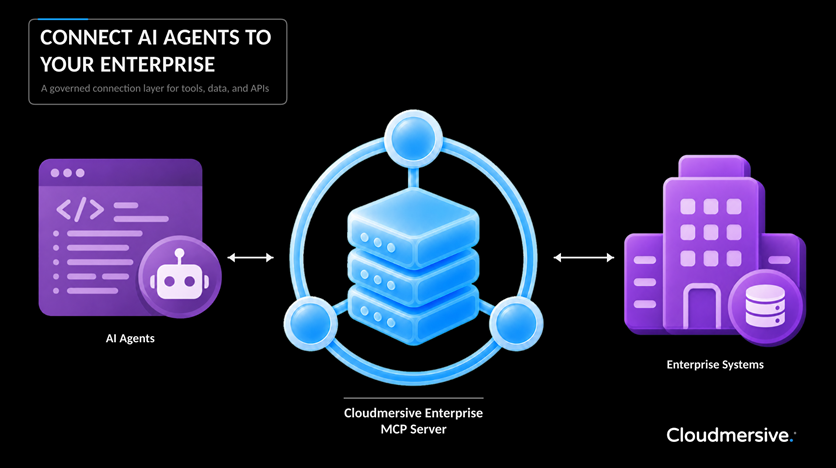
 Virus Scan APIs
 Content Disarm and Reconstruction APIs
 Spam Detection APIs
 Document Conversion & Processing APIs
 Document AI APIs
 Natural Language Processing (NLP) APIs
 Optical Character Recognition (OCR) APIs
 Image and Face Recognition and Processing APIs