
|
| Intelligent AI Business Automation with Cloudmersive |
| 4/29/2026 - Brian O'Neill |
Every enterprise document workflow has the same underlying problem. Documents funnel in from outside the organization or move between internal systems, and at every step in that workflow, something must interpret what they contain before anything productive can be done with them. The interpretation step is where manual effort accumulates, racking up costs, and custom processing logic gets stitched together, one workflow at a time, until the end-to-end process becomes brittle. Cloudmersive Document AI solves this problem with a uniquely powerful business automation model. With Document AI, enterprises can pull from a unified suite of intelligent document processing capabilities through a single API platform. That means there’s no need to build complex extraction, classification, or analysis logic in-house from scratch, and there’s no need to manage an unwieldy, ever-expanding portfolio of unrelated vendor tools. Below, we’ll walk through what the Cloudmersive Document AI suite covers, and where each piece fits into your automation architecture. Extracting Raw TextGetting readable text from a file is the most fundamental Document AI operation. The Extract Text API handles this across a wide range of input formats, including DOCX, PDF, XLSX, PPTX, EML, MSG, and image formats like JPG, PNG, and WEBP. It returns page-by-page text results, which makes it straightforward to feed downstream into any number of different systems. Extracting Specific FieldsWhere raw text extraction gives you every bit of text content in a document, field extraction gives you exactly what you ask for. The Extract Fields API accepts a comma-separated list of field names as a header parameter, and it returns the corresponding values from the input document. If, for example, you need an invoice number and a vendor name from an invoice document, you specifically ask for those fields and get them back without any additional parsing work on your end. For workflows where field definitions are more complex and nuanced, the Advanced Field Extraction API accepts a more detailed request. Each field can be defined with a name, an optional description, an example value, and a flag (true or false) indicating whether that field is required. Extracting TablesThe Extract Tables API specifically handles instances of structured tabular data in a document. It returns a Extracting Fields and Tables – All at OnceWhen we need both field values and table data returned in a single API call, the Extract All Fields and Tables API combines both extraction types into one response. It’s worth noting that this API offers a Classifying DocumentsBefore we take advantage of any of the previous extraction APIs, it’s often important to know what type of document we’re dealing with. The Document Classification API labels documents based on their contents, intelligently distinguishing between the likes of invoices, receipts, contracts, and forms without requiring any predefined category list. The Advanced Classification endpoint expands on this with a request body that accepts custom category definitions. You provide each category with a name and accompanying plain-language description, and the API evaluates the document against that list rather than attempting to freely classify it. Summarizing DocumentsThe Extract Summary API generates a concise one-paragraph plain-language summary of any document’s contents. The use cases are extremely broad: you can use this for anything from populating metadata fields at the point of intake to surfacing context for reviewers in an approval queue. For workflows that need a bit more control, the Advanced Extract Summary API can be used to change the length of summary outputs through a Both versions of the Extract Summary API support multilingual workflows, accepting ISO 639 language codes to produce summaries in languages other than the English default. Answering Questions about DocumentsOne of Document AI’s most flexible capabilities is the option to pose structured questions directly against a document and return structured answers. The Answer Questions API accepts three question types in a single request: Boolean questions (yes or no answer), multiple-choice questions (evaluated against a set of response options you provide), and free-response questions (which return an open-ended answer generated based on AI analysis of the document content). Enforcing Custom Document PoliciesThe Policy Enforcement API takes document intelligence one step further by evaluating a document against a set of custom rules you supply. Based on these rules, the API returns a structured violation report. Each rule carries an ID, a type, and a plain language description, and the response comes back with a Compared with the rest of the Document AI suite, this API performs a quasi-security function, and that makes it a natural fit for intake workflows where documents cannot be processed (e.g., for fear of compliance violations) without adhering to a strict set of rules. Putting it TogetherDocument AI APIs can be chained together at natural chokepoints in a document workflow without introducing the complexity of surplus authentication systems and new SDKs. A document intake pipeline might begin with classification to identify what came into your network, move on to field extraction to pull out its relevant data, run a policy check before that data reaches any sensitive automated systems downstream, and finish with a summary generated for human reviewers. Each step is a single API call, all connected by a single API key. If your enterprise is building out document automation at scale, this consistency reduces integration overhead considerably, and it makes the overall pipeline easier to maintain as requirements change overtime. To explore the full Cloudmersive Document AI suite, please feel free to visit the Swagger documentation and API docs for code examples, or reach out to our sales team directly for additional information. |
Sign Up Now or 

 Blog
Blog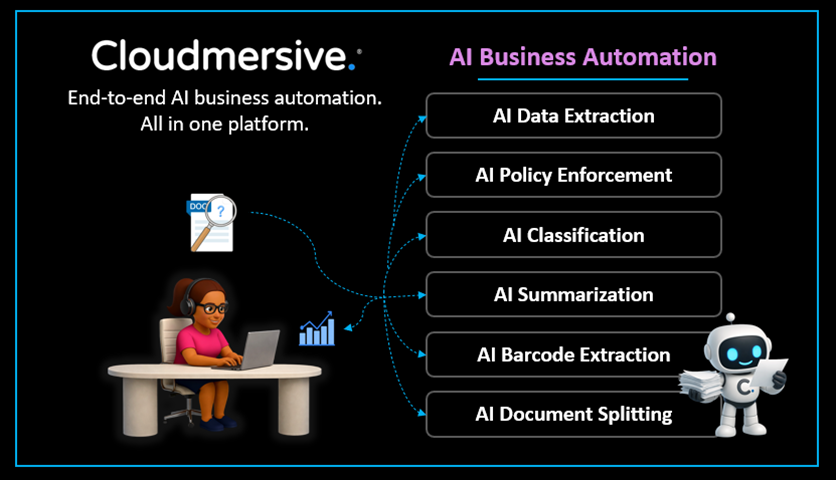
 Virus Scan APIs
 Content Disarm and Reconstruction APIs
 Spam Detection APIs
 Document Conversion & Processing APIs
 Document AI APIs
 Natural Language Processing (NLP) APIs
 Optical Character Recognition (OCR) APIs
 Image and Face Recognition and Processing APIs