
|
| Block Malicious PDFs with Cloudmersive 360-Degree Content Protection |
| 9/23/2026 - Brian O'Neill |
PDFs keep business moving. Customers submit insurance claims, vendors share invoices, and candidates send resumes, all in a standard format our teams recognize immediately. Unfortunately, attackers appreciate that familiarity every bit as much. A document with a convincing filename and a perfectly ordinary first page can carry hidden scripts and other embedded content that put the person opening it at risk. Cloudmersive 360-Degree Content Protection gives your organization a deeper view of the PDFs entering your workflows. Through the Advanced Virus Scan API, you can combine malware detection with configurable content verification to block dangerous files before they reach the employees and applications that depend on them. Familiar documents can carry unfamiliar threatsRecent attacks have brought PDF security back into focus. In April 2026, an emergency update was released for an Acrobat and Reader vulnerability already being exploited in the wild. The researcher who uncovered the attack described a malicious PDF using JavaScript to collect local information, send data to an external server, and retrieve additional code. For enterprise teams, there’s a classic, practical lesson to be learned here: opening a document can expose far more than just its visible contents. Keeping PDF software updated is critically important, and inspecting incoming documents gives organizations another valuable opportunity to stop dangerous content before anyone opens it. That’s where we’re excited to help. Cloudmersive brings detailed file inspection directly into the workflows where your customers, partners, and employees already exchange documents. Give every PDF a closer lookCloudmersive’s Virus Scan API checks incoming files against a continuously updated list of 17+ million malware signatures , while 360-Degree Content Protection expands upon the basic threat detection service by evaluating additional characteristics that can make documents unsafe for your environment. File format verification is a great place to start: a file arriving with a This gives a PDF submission portal a much stronger basis for accepting documents. Your team can define which formats belong in the workflow and verify incoming files against those expectations, alongside malware scanning. The familiar filename becomes the beginning of the inspection, rather than the basis for absolute trust. Take control of hidden PDF behaviorPDFs can include interactive features intended to serve valid, useful purposes in the right setting. Those same features can create unnecessary exposure when an application only really needs a readable invoice, claim form, supporting document, or other transactional content. With Cloudmersive, you can set custom restrictions against PDFs containing JavaScript or HTML. When those restrictions are active, a PDF containing that type of content fails verification instantly with no further qualification. Your application can then prevent that file from entering the approved document workflow, even if no known malware signature has been matched. Cloudmersive also gives you control over unwanted document actions. These are instructions that can cause a file to take actions outside our control – like opening external content or accessing local resources, for example. Blocking unwanted actions keeps that unwanted hidden functionality away from users who are expecting to open an ordinary document. We pride ourselves in bringing this unparalleled flexibility to our customers. An invoice intake process can enforce a clear requirement for documents without active content, while another workflow can apply the settings appropriate to its own business needs. Your specific security requirements become a consistent part of document intake. PDF Protection that fits your architectureOur API-first approach gives your team flexibility to bring 360-Degree Content Protection directly into customer portals, backend services, and automated workflows. With SDKs for languages including C#, Java, Python, and Node.js, plus custom connector support for Power Automate, you can build with the tools your team already knows. You control where inspection happens and how your application responds. Detailed scan results let your team build approval, rejection, and review logic around your business requirements, making PDF protection part of your own customer experience. Deployment optionsCloudmersive PDF scanning is available through flexible deployment models to support different performance, governance, and infrastructure needs. Public CloudCloudmersive Public Cloud provides access through a multi-tenant cloud API. It offers a simple way to add PDF scanning to applications and automated workflows without managing the scanning infrastructure yourself. Managed InstanceA Managed Instance provides dedicated Cloudmersive-managed infrastructure with service-level agreements, customizable configuration, and enterprise security controls. You get dedicated capacity while Cloudmersive manages the underlying environment. Private CloudPrivate Cloud deployment brings Cloudmersive into your own data center or chosen cloud environment. It’s a good fit for organizations that need direct control over infrastructure, network boundaries, and data location. PaaSCloudmersive can be deployed through supported platform services such as Azure App Service or Azure Kubernetes Service. This option provides additional flexibility for teams building within existing Azure architectures. Government CloudGovernment Cloud deployment places Cloudmersive within a specified government cloud region. This helps government organizations and contractors address specific data-governance and infrastructure requirements. Bring greater confidence to every PDF workflowYour organization should be able to welcome the documents it needs with security built into the process. Cloudmersive 360-Degree Content Protection makes that possible by combining malware scanning, file verification, and control over risky PDF content into one flexible integration. We’re excited to help you put that protection to work. Explore the [Virus Scan API documentation]( Virus Scan API | API Reference), create a free account, or contact our team to discuss securing your PDF workflows with Cloudmersive. |
Sign Up Now or 

 Blog
Blog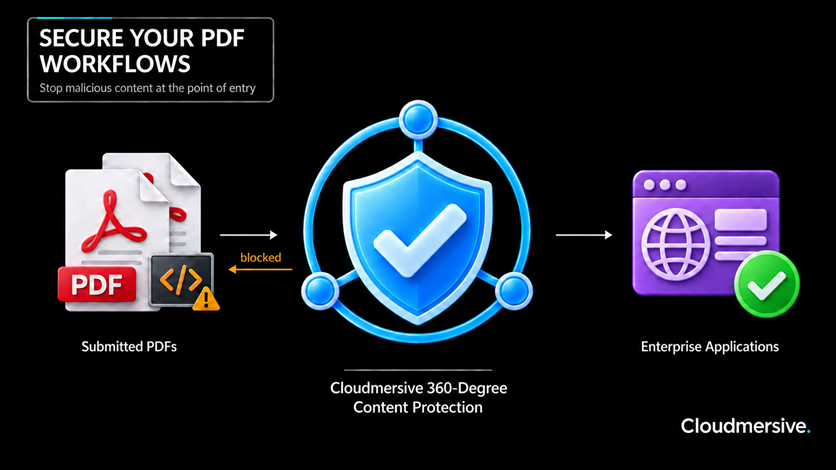
 Virus Scan APIs
 Content Disarm and Reconstruction APIs
 Spam Detection APIs
 Document Conversion & Processing APIs
 Document AI APIs
 Natural Language Processing (NLP) APIs
 Optical Character Recognition (OCR) APIs
 Image and Face Recognition and Processing APIs