
|
| What is an MCP Gateway and How Does it Work | ||||||||||||
| 9/8/2026 - Brian O'Neill | ||||||||||||
We’re only a few years into the AI revolution, and the days of primarily chat-based AI usage for enterprises are already numbered. AI agents are increasingly gaining the ability to participate in real day-to-day enterprise work. It’s easy to understand why. With the right connections in place, a specialized agent can complete a ton of useful time-saving tasks. It can retrieve one or more specific documents from SharePoint, look for information stored in some internal business system, rigorously inspect files for security threats, and/or initiate any number of other uniquely defined processes. This agent-enterprise relationship is possible because Model Context Protocol, or MCP, establishes a standardized way to make the required connections available to the agent. The flexibility brought about by MCP brings about a tremendous opportunity to improve enterprise efficiency – but it also creates its own set of challenges. As organizations connect an increasing number of agents to a broader volume of tools, credentials, APIs, and sensitive data, managing every enterprise connection independently becomes much more difficult. That’s where the MCP gateway comes into play. It gives enterprises the centralized place they need to manage how agents reach MCP servers in addition to the sensitive systems behind them. In this article, we’ll explain what an MCP gateway is, how it works, and why it matters for securely connecting AI agents to enterprise tools and data. What is Model Context Protocol?Model Context Protocol (MCP) is an open protocol that standardizes communication between AI applications and external capabilities. MCP allows enterprise developers to make tools and information available to agents through a shared protocol, rather than creating a unique integration for every combination of agent and business system.
Key Term
Model Context Protocol
Model Context Protocol, or MCP, is an open protocol that standardizes how AI applications connect to external tools, data sources, and services. It allows compatible systems to exchange structured requests and responses without requiring a unique integration for every agent and application. The official MCP architecture includes three primary participants.
An MCP server can expose three primary categories of capability.
This separation is important for understanding the MCP concept. MCP defines how AI applications discover and interact with capabilities, but it doesn’t decide how an organization should actually govern them.
Key Term
MCP Server
An MCP server makes tools, resources, and prompts available to compatible MCP clients. It can run locally or remotely and translate MCP requests into actions against connected applications, APIs, databases, and other data sources. HostAI application initiates request
ConnectMCP client maintains connection
ExposeMCP server presents capabilities
ExecuteTool acts or data is returned
Like most components of modern enterprise architecture, an MCP server can run locally or remotely. A local MCP server commonly communicates through standard input and output, while a remote MCP server typically uses something like Streamable HTTP to serve clients across a network. In either case, the server creates a structured interface between an AI application and the capabilities it needs access to.
Key Term
Streamable HTTP
Streamable HTTP is an MCP transport designed for communication with remote servers over HTTP. It supports standard request and response exchanges along with streamed server messages through a shared MCP endpoint. What is an MCP Gateway?An MCP gateway is an intermediary that manages access between AII applications and one or more MCP servers, enterprise APIs, or connected data sources.
Key Term
MCP Gateway
An MCP gateway is an intermediary control layer between AI applications and MCP servers or connected enterprise services. It can centralize authentication, policy enforcement, routing, approvals, logging, and other controls across multiple MCP connections. An MCP gateway is an architectural component rather than a separate participant formally defined by the MCP specification. It’s important to note that an MCP gateway is not a separate participant formally defined by the MCP specification. The protocol itself defines hosts, clients and servers; the “gateway” describes an architectural layer organizations can add to manage those connections centrally. Without a gateway in place, individual agents can still connect directly to separate MCP servers, and that can work perfectly fine for local development or a small collection of tools. At enterprise scale, however, direct connections often lead to fragmented authentication rules and duplicated credentials. They also habitually result in inconsistent policy enforcement and limited visibility into each agent’s activity (i.e., tool usage and the data being accessed). An MCP gateway introduces a shared control point for managing agent access to MCP servers and connected systems. It can be configured to determine which specific agents are allowed to connect, which tools agents are allowed to discover, which operations agents are allowed to request, and what should happen before any result is returned to a system or user. How an MCP Gateway WorksFirst and foremost, the precise behavior of an MCP gateway always depends on its implementation. The typical request path, however, follows a more consistent, established pattern. A gateway’s job begins when an AI application identifies a tool that can help complete a user’s request. The MCP client associated with that application sends the tool call through the gateway. The gateway first authenticates the caller and then evaluates the request against the organization’s access policies (in this case, we’re thinking of “policies” in the most practical sense). An agent used by a finance team, for example, might be allowed to retrieve invoice data, but gateway policies might simultaneously prevent them from calling tools that modify payment records. If a request is permitted, the gateway next routes that request to the appropriate MCP server or backing API. That destination can authenticate the request using its own credentials; this keeps access to different systems neatly separated. At this point in the gateway workflow, additional controls can be applied. For example, a write operation could be paused for human review, or an outbound request could be checked against an approved destination list. A document returned from a SharePoint request could be fully inspected and/or converted to a new document format before the agent receives it. At the end, the gateway returns the governed result to the agent and records the activity somewhere for eventual troubleshooting, monitoring, or auditing needs. HostAI application initiates request
ConnectMCP client maintains connection
ExposeMCP server presents capabilities
ExecuteTool acts or data is returned
Note the clear separation of responsibilities here. The agent decides which available capability it needs, while the gateway enforces the boundaries under which that capability can be used. Why Enterprises Use MCP GatewaysScale of access is the central pain point that drives MCP gateway adoption. The value of a gateway becomes significantly more apparent as agent access expands across the enterprise. An organization might start out with only one agent retrieving documents from a single repository. Over time, that same environment might expand to include development agents calling internal APIs, support agents searching customer records, finance agents working with invoices, and operations agents initiating browser-based tasks. Each new connection introduces a completely new set of credentials, permissions, payloads, and possible actions that can be taken. With an MCP gateway in place, those relationships are very manageable; otherwise, they quickly become a sprawling mess. Centralized Access ControlGateways can be configured to give different agents or teams access to different sets of tools. This limits unnecessary exposure, and it also makes it easier to revoke access without reconfiguring every single connected system. Credential SeparationIn most enterprises, it’s standard practice that connected APIs authenticate using credentials intended specifically for each connected system. Credential separation prevents one agent connection from becoming a broadly-shared key to multiple services. Consistent Operational ControlsThrough a gateway, thinks like session expiration, request-size caps, payload limits, tool availability, etc. can be governed from one common layer. This prevents and agent from using a valid tool in an uncontrolled way. Session expiration, request-size caps, payload limits, tool availability, outbound destinations, and rate limits can be governed from a common layer. This helps prevent an agent from using a valid tool in an uncontrolled way. Human OversightWhile authorization broadly determines whether an agent is allowed to request an operation, human approval decides whether a particular sensitive operation should proceed in the first place. That matters a lot for actions with meaningful business consequences like writes, exports, payments, and others. Visibility and AuditabilityGateways establish a centralized record of tool activity. That includes everything the enterprise needs to know about originating agent, user identity, selected tool, response status, and relevant payload metadata. It might seem like a lot of information to keep hold of, but it becomes extremely valuable when teams need to troubleshoot an integration, investigate unexpected activity, or demonstrate how access is being governed. Response ProtectionMCP tools don’t always return clean text or structured JSON. For file-based operations, they’ll return PDFs, images, spreadsheets, or other binary content. A well-designed gateway can inspect and normalize that content before it ever reaches the agent. That’s especially useful when connected systems return documents from external users or shared repositories where content can’t be trusted implicitly. MCP Gateway vs MCP Server vs API GatewayMCP is a new enough concept in enterprise technology that it’s worth explicitly distinguishing the concept from other similar-sounding ideas. MCP gateways, MCP servers, and API gateways are easy to confuse without sufficient context; they occupy nearby positions in an enterprise architecture, but they server very different purposes.
Architecture Comparison
MCP Gateway vs MCP Server vs API Gateway
These components can (and, in most cases, should) work together cohesively. For example, an MCP server might translate agent tool calls into request to existing REST APIs while an MCP gateway governs which agents are allowed to make those calls in the first place. The remote MCP endpoint can then be deployed behind an organization’s existing reverse proxy or API gateway. Think of it like this: an MCP gateway doesn’t need to replace established API management infrastructure – it can simply add controls that are specifically useful when AI agents discover and invoke tools through MCP. How Cloudmersive Delivers Enterprise MCP Gateway CapabilitiesThe Cloudmersive MCP Gateway brings the control-layer concepts covered in this article into a self-hosted enterprise product. Positioned between AI agents and the MCP servers and services they rely on, it provides a common place to authenticate callers, enforce enterprise policies, and govern which tools each agent can use. Through the Cloudmersive MCP Gateway, organizations can apply default-deny access, granular scopes, outbound connection controls, usage limits, human approval gates, and centralized audit logging. Connected systems continue using separate credentials, helping teams expand agent capabilities without distributing sensitive access and governance logic across every integration. The Cloudmersive MCP Gateway also works alongside the Cloudmersive MCP Server. The gateway governs access to enterprise systems, internal APIs, and Cloudmersive security, AI, and business automation tools. It also helps protect the response path by scanning and preparing binary content before it reaches an agent, extending the gateway beyond basic routing into a much more complete agent security and governance layer. Learn more about the Cloudmersive MCP Gateway or schedule a consultation with a Cloudmersive representative to discuss your systems and security requirements. |
Sign Up Now or 

 Technical Articles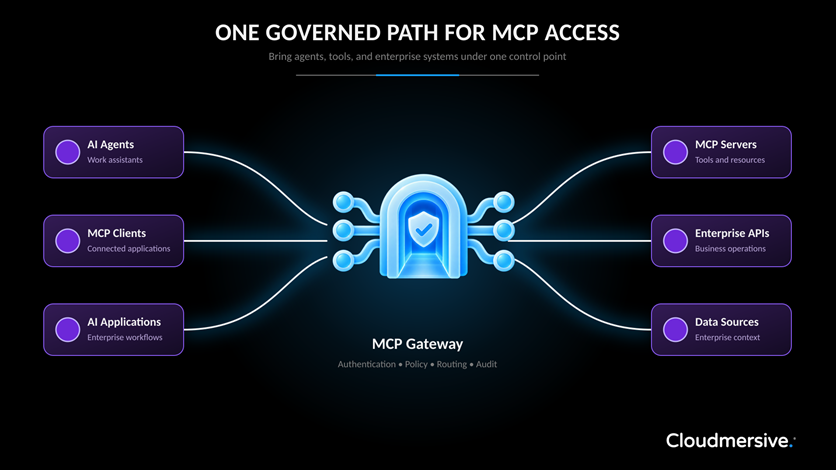
 Virus Scan APIs
 Content Disarm and Reconstruction APIs
 Spam Detection APIs
 Document Conversion & Processing APIs
 Document AI APIs
 Natural Language Processing (NLP) APIs
 Optical Character Recognition (OCR) APIs
 Image and Face Recognition and Processing APIs