Most document processing pipelines are built around extraction and validation. We pull data from a file, check it against some expected format, and route it somewhere useful. That covers a lot of ground, but it leaves out something valuable in high-volume workflows: a quick and readable answer to the question of what a document actually contains. A “too long, didn’t read” (TLDR), if you will.
Of course, generating that answer manually doesn’t scale. And building summarization logic from scratch is an arduous process. That involves layering OCR, text extraction, and NLP models on top of each other before you produce a single line of output. For most teams, that’s far more development and maintenance than the feature warrants.
Generate document summaries with Cloudmersive Document AI
The Cloudmersive Extract Summary API gives developers a simpler approach to AI-summary tooling. It accepts a document as an input and returns a single coherent paragraph summarizing its contents. That's all there is to it; a quick exchange of document and summary between two secure servers.
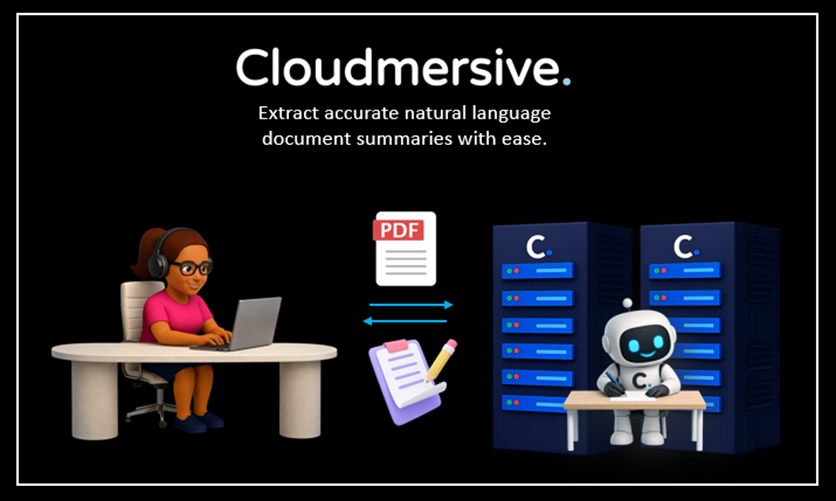
The simplicity of this exchange masks the underlying complexity of the model – and that’s exactly the point. The difficulty is neatly abstracted away from the developer’s environment. It handles the extraction and reasoning internally, which means developers just need to point it at a file and handle the response. The Extract Summary API supports standard office formats like DOCX, PDF, XLSX, and PPTX, as well as image formats like JPG, PNG, and WEBP.
Walking through an example API call
In this walkthrough, we’ll build a quick example API call in Python using Google Colab (Python 3) and walk through what the response looks like. The code examples we’ll be using come directly from the Cloudmersive Swagger page, which you can find here (we’ll also provide those below as we move along).
Before we get started, please note that you’ll need a free Cloudmersive API key to follow along and make API requests. Creating a free account gets you 800 API calls per month with no commitments (this API consumes 100 calls per page, so keep that in mind when choosing test documents).
Installing the SDK
We’ll kick things off by installing the Document AI SDK in our terminal. We’ll use the below pip command for that:
pip install cloudmersive-documentai-api-client
Importing Resources
Next up, we’ll pull in the resources we need to make our request:
from __future__ import print_function
import time
import cloudmersive_documentai_api_client
from cloudmersive_documentai_api_client.rest import ApiException
from pprint import pprint
Structuring the Request
Building our request is easy. We’ll start by copying raw example code from the Swagger page:
# Configure API key authorization: Apikey
configuration = cloudmersive_documentai_api_client.Configuration()
configuration.api_key['Apikey'] = 'YOUR_API_KEY'

# create an instance of the API class
api_instance = cloudmersive_documentai_api_client.ExtractApi(cloudmersive_documentai_api_client.ApiClient(configuration))
recognition_mode = 'recognition_mode_example' # str | Optional; Recognition mode - Advanced (default) provides the highest accuracy but slower speed, while Normal provides faster response but lower accuracy for low quality images (optional)
language = 'language_example' # str | Optional; Three-letter language code (ISO 639) for the summary.  Default is ENG.  Possible language codes are: AAR,ABK,ACE,ACH,ADA,ADY,AFA,AFH,AFR,AIN,AKA,AKK,ALB,ALE,ALG,ALT,AMH,ANG,ANP,APA,ARA,ARC,ARG,ARM,ARN,ARP,ART,ARW,ASM,AST,ATH,AUS,AVA,AVE,AWA,AYM,AZE,BAD,BAI,BAK,BAL,BAM,BAN,BAQ,BAS,BAT,BEJ,BEL,BEM,BEN,BER,BHO,BIH,BIK,BIN,BIS,BLA,BNT,BOD,BOS,BRA,BRE,BTK,BUA,BUG,BUL,BUR,BYN,CAD,CAI,CAR,CAT,CAU,CEB,CEL,CES,CHA,CHB,CHE,CHG,CHI,CHK,CHM,CHN,CHO,CHP,CHR,CHU,CHV,CHY,CMC,CNR,COP,COR,COS,CPE,CPF,CPP,CRE,CRH,CRP,CSB,CUS,CYM,CZE,DAK,DAN,DAR,DAY,DEL,DEN,DEU,DGR,DIN,DIV,DOI,DRA,DSB,DUA,DUM,DUT,DYU,DZO,EFI,EGY,EKA,ELL,ELX,ENG,ENM,EPO,EST,EUS,EWE,EWO,FAN,FAO,FAS,FAT,FIJ,FIL,FIN,FIU,FON,FRA,FRE,FRM,FRO,FRR,FRS,FRY,FUL,FUR,GAA,GAY,GBA,GEM,GEO,GER,GEZ,GIL,GLA,GLE,GLG,GLV,GMH,GOH,GON,GOR,GOT,GRB,GRC,GRE,GRN,GSW,GUJ,GWI,HAI,HAT,HAU,HAW,HEB,HER,HIL,HIM,HIN,HIT,HMN,HMO,HRV,HSB,HUN,HUP,HYE,IBA,IBO,ICE,IDO,III,IJO,IKU,ILE,ILO,INA,INC,IND,INE,INH,IPK,IRA,IRO,ISL,ITA,JAV,JBO,JPN,JPR,JRB,KAA,KAB,KAC,KAL,KAM,KAN,KAR,KAS,KAT,KAU,KAW,KAZ,KBD,KHA,KHI,KHM,KHO,KIK,KIN,KIR,KMB,KOK,KOM,KON,KOR,KOS,KPE,KRC,KRL,KRO,KRU,KUA,KUM,KUR,KUT,LAD,LAH,LAM,LAO,LAT,LAV,LEZ,LIM,LIN,LIT,LOL,LOZ,LTZ,LUA,LUB,LUG,LUI,LUN,LUO,LUS,MAC,MAD,MAG,MAH,MAI,MAK,MAL,MAN,MAO,MAP,MAR,MAS,MAY,MDF,MDR,MEN,MGA,MIC,MIN,MIS,MKD,MKH,MLG,MLT,MNC,MNI,MNO,MOH,MON,MOS,MRI,MSA,MUL,MUN,MUS,MWL,MWR,MYA,MYN,MYV,NAH,NAI,NAP,NAU,NAV,NBL,NDE,NDO,NDS,NEP,NEW,NIA,NIC,NIU,NLD,NNO,NOB,NOG,NON,NOR,NQO,NSO,NUB,NWC,NYA,NYM,NYN,NYO,NZI,OCI,OJI,ORI,ORM,OSA,OSS,OTA,OTO,PAA,PAG,PAL,PAM,PAN,PAP,PAU,PEO,PER,PHI,PHN,PLI,POL,PON,POR,PRA,PRO,PUS,QUE,RAJ,RAP,RAR,ROA,ROH,ROM,RON,RUM,RUN,RUP,RUS,SAD,SAG,SAH,SAI,SAL,SAM,SAN,SAS,SAT,SCN,SCO,SEL,SEM,SGA,SGN,SHN,SID,SIN,SIO,SIT,SLA,SLK,SLO,SLV,SMA,SME,SMI,SMJ,SMN,SMO,SMS,SNA,SND,SNK,SOG,SOM,SON,SOT,SPA,SQI,SRD,SRN,SRP,SRR,SSA,SSW,SUK,SUN,SUS,SUX,SWA,SWE,SYC,SYR,TAH,TAI,TAM,TAT,TEL,TEM,TER,TET,TGK,TGL,THA,TIB,TIG,TIR,TIV,TKL,TLH,TLI,TMH,TOG,TON,TPI,TSI,TSN,TSO,TUK,TUM,TUP,TUR,TUT,TVL,TWI,TYV,UDM,UGA,UIG,UKR,UMB,UND,URD,UZB,VAI,VEN,VIE,VOL,VOT,WAK,WAL,WAR,WAS,WEL,WEN,WLN,WOL,XAL,XHO,YAO,YAP,YID,YOR,YPK,ZAP,ZBL,ZEN,ZGH,ZHA,ZHO,ZND,ZUL,ZUN,ZXX,ZZA. (optional)
input_file = '/path/to/inputfile' # file | Input document, or photos of a document, to extract data from (optional)

try:
    # Extract Summary from a Document using AI
    api_response = api_instance.extract_summary(recognition_mode=recognition_mode, language=language, input_file=input_file)
    pprint(api_response)
except ApiException as e:
    print("Exception when calling ExtractApi->extract_summary: %s\n" % e)
Before this does anything useful for us, we’ll need to configure our API key. The below example uses Colab’s example code to set API key strings at runtime:
# Configure API key authorization: Apikey
configuration = cloudmersive_documentai_api_client.Configuration()
configuration.api_key['Apikey'] = userdata.get('freekey')
configuration.host = "api.cloudmersive.com"
Note that we’ve also manually set the configuration.host attribute to “api.cloudmersive.com” in this example. That’s not always necessary as it should be the default host, but some environments fail to fetch that attribute correctly, so it’s worth hardcoding it in our test case.
Now we’ll configure our request parameters. We have two optional header parameters to work with in our Extract Summary request, and it’s worth knowing about them before we finalize anything.
recognitionMode controls the accuracy and speed tradeoff in our API request. Advanced is the default value, and it gives the most reliable results. Normal processes files faster, but it may produce less accurate output (particularly on lower-quality scans or images).
language is a three-level ISO 639 language code that controls what language the summary is generated in. The default is ENG, which covers most use cases – but the API supports a wide range of language codes for international workflows. If we’re processing documents in French, for example, we can set language to FRE and return a French-language summary.
In this example, we’ll submit a sample document using the default settings. Here’s the completed request we’re using in Colab:
from google.colab import userdata
import cloudmersive_documentai_api_client
from cloudmersive_documentai_api_client.rest import ApiException
from pprint import pprint

# Configure API key authorization: Apikey
configuration = cloudmersive_documentai_api_client.Configuration()
configuration.api_key['Apikey'] = userdata.get('freekey')
configuration.host = "api.cloudmersive.com"

# create an instance of the API class
api_instance = cloudmersive_documentai_api_client.ExtractApi(cloudmersive_documentai_api_client.ApiClient(configuration))
recognition_mode = '' # str | Optional; Recognition mode - Advanced (default) provides the highest accuracy but slower speed, while Normal provides faster response but lower accuracy for low quality images (optional)
language = '' # str | Optional; Three-letter language code (ISO 639) for the summary.  Default is ENG.  Possible language codes are: AAR,ABK,ACE,ACH,ADA,ADY,AFA,AFH,AFR,AIN,AKA,AKK,ALB,ALE,ALG,ALT,AMH,ANG,ANP,APA,ARA,ARC,ARG,ARM,ARN,ARP,ART,ARW,ASM,AST,ATH,AUS,AVA,AVE,AWA,AYM,AZE,BAD,BAI,BAK,BAL,BAM,BAN,BAQ,BAS,BAT,BEJ,BEL,BEM,BEN,BER,BHO,BIH,BIK,BIN,BIS,BLA,BNT,BOD,BOS,BRA,BRE,BTK,BUA,BUG,BUL,BUR,BYN,CAD,CAI,CAR,CAT,CAU,CEB,CEL,CES,CHA,CHB,CHE,CHG,CHI,CHK,CHM,CHN,CHO,CHP,CHR,CHU,CHV,CHY,CMC,CNR,COP,COR,COS,CPE,CPF,CPP,CRE,CRH,CRP,CSB,CUS,CYM,CZE,DAK,DAN,DAR,DAY,DEL,DEN,DEU,DGR,DIN,DIV,DOI,DRA,DSB,DUA,DUM,DUT,DYU,DZO,EFI,EGY,EKA,ELL,ELX,ENG,ENM,EPO,EST,EUS,EWE,EWO,FAN,FAO,FAS,FAT,FIJ,FIL,FIN,FIU,FON,FRA,FRE,FRM,FRO,FRR,FRS,FRY,FUL,FUR,GAA,GAY,GBA,GEM,GEO,GER,GEZ,GIL,GLA,GLE,GLG,GLV,GMH,GOH,GON,GOR,GOT,GRB,GRC,GRE,GRN,GSW,GUJ,GWI,HAI,HAT,HAU,HAW,HEB,HER,HIL,HIM,HIN,HIT,HMN,HMO,HRV,HSB,HUN,HUP,HYE,IBA,IBO,ICE,IDO,III,IJO,IKU,ILE,ILO,INA,INC,IND,INE,INH,IPK,IRA,IRO,ISL,ITA,JAV,JBO,JPN,JPR,JRB,KAA,KAB,KAC,KAL,KAM,KAN,KAR,KAS,KAT,KAU,KAW,KAZ,KBD,KHA,KHI,KHM,KHO,KIK,KIN,KIR,KMB,KOK,KOM,KON,KOR,KOS,KPE,KRC,KRL,KRO,KRU,KUA,KUM,KUR,KUT,LAD,LAH,LAM,LAO,LAT,LAV,LEZ,LIM,LIN,LIT,LOL,LOZ,LTZ,LUA,LUB,LUG,LUI,LUN,LUO,LUS,MAC,MAD,MAG,MAH,MAI,MAK,MAL,MAN,MAO,MAP,MAR,MAS,MAY,MDF,MDR,MEN,MGA,MIC,MIN,MIS,MKD,MKH,MLG,MLT,MNC,MNI,MNO,MOH,MON,MOS,MRI,MSA,MUL,MUN,MUS,MWL,MWR,MYA,MYN,MYV,NAH,NAI,NAP,NAU,NAV,NBL,NDE,NDO,NDS,NEP,NEW,NIA,NIC,NIU,NLD,NNO,NOB,NOG,NON,NOR,NQO,NSO,NUB,NWC,NYA,NYM,NYN,NYO,NZI,OCI,OJI,ORI,ORM,OSA,OSS,OTA,OTO,PAA,PAG,PAL,PAM,PAN,PAP,PAU,PEO,PER,PHI,PHN,PLI,POL,PON,POR,PRA,PRO,PUS,QUE,RAJ,RAP,RAR,ROA,ROH,ROM,RON,RUM,RUN,RUP,RUS,SAD,SAG,SAH,SAI,SAL,SAM,SAN,SAS,SAT,SCN,SCO,SEL,SEM,SGA,SGN,SHN,SID,SIN,SIO,SIT,SLA,SLK,SLO,SLV,SMA,SME,SMI,SMJ,SMN,SMO,SMS,SNA,SND,SNK,SOG,SOM,SON,SOT,SPA,SQI,SRD,SRN,SRP,SRR,SSA,SSW,SUK,SUN,SUS,SUX,SWA,SWE,SYC,SYR,TAH,TAI,TAM,TAT,TEL,TEM,TER,TET,TGK,TGL,THA,TIB,TIG,TIR,TIV,TKL,TLH,TLI,TMH,TOG,TON,TPI,TSI,TSN,TSO,TUK,TUM,TUP,TUR,TUT,TVL,TWI,TYV,UDM,UGA,UIG,UKR,UMB,UND,URD,UZB,VAI,VEN,VIE,VOL,VOT,WAK,WAL,WAR,WAS,WEL,WEN,WLN,WOL,XAL,XHO,YAO,YAP,YID,YOR,YPK,ZAP,ZBL,ZEN,ZGH,ZHA,ZHO,ZND,ZUL,ZUN,ZXX,ZZA. (optional)
input_file = 'Invoice.pdf' # file | Input document, or photos of a document, to extract data from (optional)

try:
    # Extract Summary from a Document using AI
    api_response = api_instance.extract_summary(recognition_mode=recognition_mode, language=language, input_file=input_file)
    pprint(api_response)
except ApiException as e:
    print("Exception when calling ExtractApi->extract_summary: %s\n" % e)
Interpreting the Response
What we’ll get back is about as compact as API responses get:
{
    'document_summary_text': 'This invoice, INV-2024-00847, from Acme Supply Co. to Northgate Logistics LLC, '
                             'dated March 14, 2024 with a due date of April 14, 2024, details a purchase of '
                             '50 Industrial Steel Brackets (12") for $700.00, 20 Heavy-Duty Mounting Hardware '
                             'Sets for $450.00, 5 Warehouse Shelving Units (72"H) for $945.00 and Freight & '
                             'Handling for $85.00. The subtotal is $2,180.00, with a tax of $136.25, bringing '
                             'the total amount due to $2,316.25. Payment terms are Net 30, payable via ACH or check.',
    'successful': True
}
Successful is our sanity check: it confirms the request completed without error. DocumentSummaryText contains the one-paragraph summary the API generated from our input.
We’ll find that our summary is immediately usable downstream. It’s great for anything from contracts to invoices, and even ID and business cards. No matter what document we supply, the Extract Summarization API will return a clear and often data-driven story about that document’s contents.
We can feed output summaries to a search index to improve document discoverability, attach them to review queues so approvers understand what they’re looking at before opening a file, or even pass them along to any other system that benefits from knowing what t document says without processing the full content.
Conclusion
The Cloudmersive Extract Summary API makes it straightforward to add document summarization capabilities to a Python application without building out the underlying pipeline. It’s exactly what developer tools should be: point and shoot, with easy response handling.
If you’re looking for help integrating this API into a larger document processing workflow, feel free to reach out to the Cloudmersive team.



 Technical Articles
 Virus Scan APIs
 Content Disarm and Reconstruction APIs
 Spam Detection APIs
 Document Conversion & Processing APIs
 Document AI APIs
 Natural Language Processing (NLP) APIs
 Optical Character Recognition (OCR) APIs
 Image and Face Recognition and Processing APIs