
|
| Can Antivirus Scan Password Protected ZIP Files |
| 8/13/2026 - Brian O'Neill |
On one hand, scanning password protected ZIP files is straightforward: if a security tool can see the files inside a ZIP archive, it can scan them. If it can’t see inside, it obviously can’t meaningfully evaluate what is there. The existence of password protection doesn’t change that basic rule; it just determines whether inspection is possible. The more interesting part is not whether scanning works, but what has to happen under the hood for it to work correctly. A password on a ZIP file is typically intended to act as a security barrier. In practice, however, it works more like an access control mechanism. It decides who gets to open the archive, and once the contents become accessible, antivirus scanning behaves normally. When access isn’t available, the system has to make a policy decision without visibility. That’s where the real complexity begins. Below, we’ll answer all the most pressing questions about how antivirus tools handle password-protected ZIP files, what actually gets scanned, and what risks these encrypted archives can introduce. 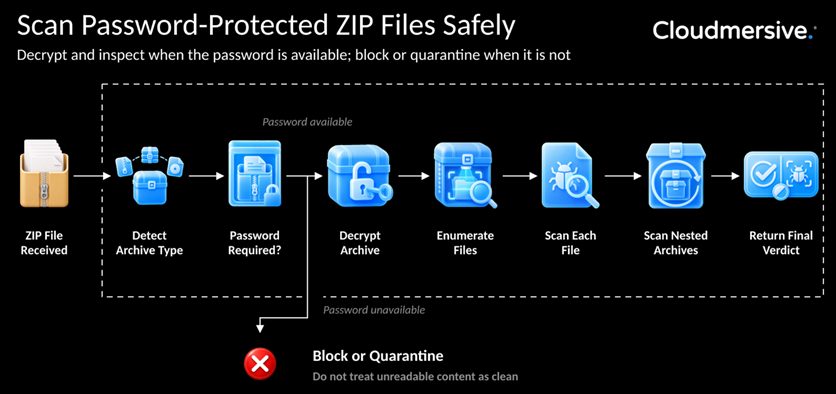 Do Antivirus Programs Scan Inside ZIP FilesThe answer is yes, but not in the way people often imagine. A ZIP file is just a container. It compresses and groups files together, but it does not fundamentally change what those files are in any way. An executable inside a ZIP is still an executable, a script is still a script, and a document with macros is still capable of running code. Because of that, antivirus systems do not treat ZIP files as single objects. They unpack them and inspect what's inside piece by piece. Typical ZIP Scanning Workflow📦 ZIP file received → 🔍 Identify archive type → 📂 Open in sandboxed environment → 📑 Enumerate files → 🧪 Scan each file → 🔁 Scan nested archives → ✅ Final verdict This recursive behavior matters because real-world threats rarely appear in a flat structure. Attackers often layer archives inside archives specifically to force multiple rounds of inspection. A ZIP file might contain a RAR file, which contains another archive, which finally contains a malicious payload. Each layer has to be opened before the scanner can reach anything meaningful. Cloudmersive’s article on how recursive malware scanning navigates compressed archives goes deeper into that process, but the key idea is ultimately simple: scanning only works as far as extraction is possible. What Changes When a ZIP File Is Password ProtectedAt a technical level, password protection introduces encryption around the contents of the archive. That means the scanner can still recognize the file as a ZIP, but it can’t interpret what's inside it without the password. The internal data is no longer in a readable form; it's intentionally obscured. Antivirus detection depends on visibility. It looks for known malware patterns, suspicious structures, embedded scripts, and behavioral indicators. Encryption removes access to all of that. So the scanner isn’t “failing” in a password-protected scenario. It’s simply being denied the information it needs to make a determination. Can Antivirus Scan an Encrypted ZIP Without the PasswordThe short answer: no. A security system can still technically do something useful with the file: 📦 Encrypted ZIP detected → 🔐 Detect encryption → ⚠️ Policy decision → 🚫 Block / 🗂️ Quarantine / 📄 Allow (rare) But it cannot inspect the actual contents without decryption. This leads to a key distinction:
Only the second produces a real security verdict. Some systems attempt limited workarounds, like trying known passwords or analyzing metadata, but these are edge cases. They don’t replace actual access to the decrypted content. What Happens When the Password Is AvailableOnce the password is known and provided through a trusted process, everything returns to a normal scanning workflow. Decrypted ZIP Scanning Workflow🔐 Password provided → 🔓 Decrypt archive → 📂 Enumerate files → 🧪 Scan each file → 🔁 Scan nested archives → ✅ Final result Nothing about the malware detection process changes. The only difference is that the scanner now has access to the data it needs. Are Password Protected ZIP Files SafeThis is where the biggest misunderstanding usually shows up. Password protection is not a safety feature. It is a privacy feature. It controls who can open a file, not whether the file is safe to open. A password-protected ZIP file can contain anything: legitimate documents, harmless data, or malicious payloads. Encryption does not evaluate or filter content; it only hides it. That’s why attackers frequently use encrypted archives in phishing campaigns. Common Attack Delivery Flow📧 Email delivered → 📦 Encrypted ZIP attached → 🔑 Password in message → 👤 User opens archive → 💥 Payload executed Common disguises include:
The important point isn't that encrypted archives are inherently dangerous—it’s that encryption removes visibility, and visibility is what security tools rely on. Why Password Protected Archives Create a Security Blind SpotThe issue becomes more noticeable in automated systems. A human might hesitate when they see an encrypted file, but a system will follow its configured rules. 📨 Email gateway → ☁️ Cloud ingestion → ⚙️ Processing pipeline → 🤖 AI / extraction systems → 📊 Downstream storage If any stage cannot inspect the ZIP contents, the file may still move forward. That creates a blind spot: the organization can track the file’s movement, but it cannot verify what the file contains. And once the file lands inside trusted infrastructure, other systems may extract, index, or execute it without ever having properly scanned it. Should Organizations Allow Password Protected ZIP UploadsThere's no single correct answer—but there should be a deliberate one. 📦 Encrypted ZIP detected → 🔓 Decrypt & scan / 🚫 Block / 🗂️ Quarantine / ✅ Allow 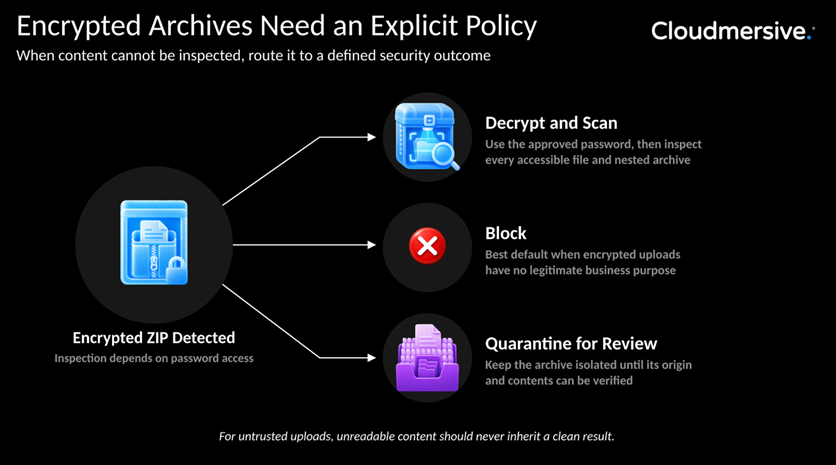 The key decision is not whether to “support ZIP files,” but what to do when inspection is impossible. For most untrusted sources, the safest default is simple: if you can’t inspect it, you should assume it's unsafe. What About Nested or Multipart Encrypted ArchivesOnce you move beyond a single ZIP file, things get layered quickly. Encryption can exist at multiple levels, and each level affects what the scanner can see. 📦 ZIP → 📦 RAR → 📦 7Z → 💣 Payload Common scenarios include:
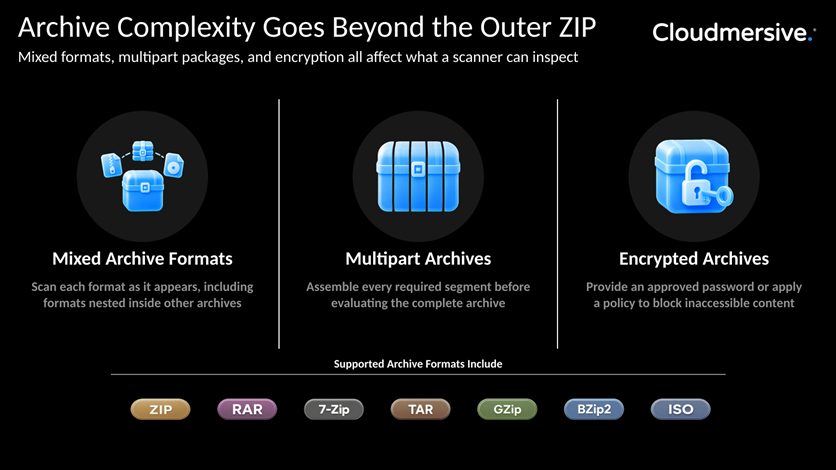 Each layer has to be opened before the next can be evaluated. If any layer is inaccessible, the scan can’t fully complete. Security decisions can’t rely on the outermost file alone, because the outer layer is often just a wrapper. How Cloudmersive Handles Password Protected ZIP FilesCloudmersive supports both sides of the problem: encrypted archives that can’t be inspected, and encrypted archives that can be safely decrypted and scanned. When the Password Is Not AvailableThe Cloudmersive Advanced Virus Scan API can detect encrypted archives and report them using the The This ensures the system doesn’t silently accept unverified content. When the Password Is AvailableIf a valid password is provided, Cloudmersive’s Document Conversion API can decrypt the archive using the Decrypt and Scan Workflow🔐 ZIP + password → 🔓 Decrypt API → 🧪 Malware scan → ✅ Final decision Cloudmersive also supports recursive scanning, multipart archive handling, and configurable limits for depth, size, and file count. Key Takeaways
Cloudmersive’s archive processing and malware scanning APIs support both secure decryption workflows and strict policy enforcement for encrypted files. |
Sign Up Now or 

 Technical Articles
 Virus Scan APIs
 Content Disarm and Reconstruction APIs
 Spam Detection APIs
 Document Conversion & Processing APIs
 Document AI APIs
 Natural Language Processing (NLP) APIs
 Optical Character Recognition (OCR) APIs
 Image and Face Recognition and Processing APIs